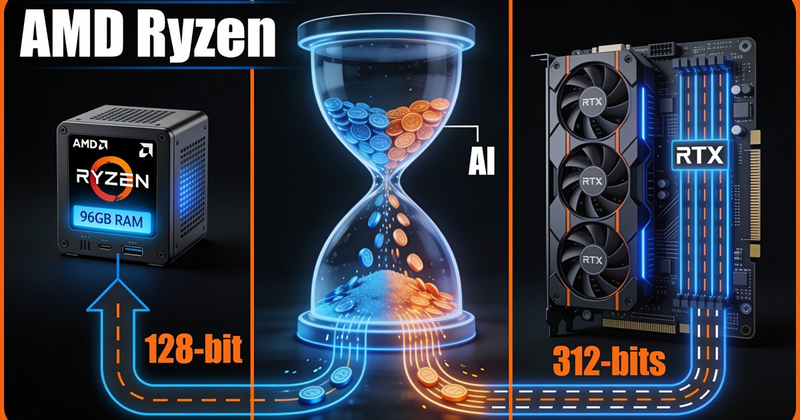
You bought a mini PC with an AMD Ryzen AI 9 HX 370 and 96GB of LPDDR5x memory. The spec sheet screams "AI powerhouse": 12 Zen 5 cores, Radeon 890M graphics, a 50 TOPS NPU, and enough unified memory to fit models that make discrete GPUs weep. So why does vLLM on Lemonade feel like it's running through molasses?
The answer isn't the CPU. It isn't the software stack (well, not only the software stack). It's a single hardware spec that almost nobody checks before buying: memory bus width.
@beamnxw — the pseudonymous hardware reviewer behind llmpicker.blog — dropped a bombshell thread on X last week after benchmarking 19 GPUs for LLM inference. His core finding, distilled: "VRAM defines what runs, but bandwidth tells what works."
The thread has 333K views for a reason. It articulates something the local LLM community has been learning the hard way since 2024.
Here's why this distinction matters. When a language model generates tokens (the "decode" phase), each new token requires reading the entire set of model weights from memory. The GPU isn't doing heavy math during decode — it's mostly waiting for data to arrive. This makes token generation a memory-bandwidth-bound process, not a compute-bound one.
Think of it like a water tank:
A 96GB tank sounds incredible. But if the pipe is narrow, you'll be waiting a long time for anything to come out.
Here's the spec sheet that actually matters:
| Hardware | Bus Width | Bandwidth (Effective) | 8B Q4 Model | 70B Q4 Model |
|---|---|---|---|---|
| HX 370 (96GB LPDDR5x) | 128-bit | ~96 GB/s | ~20 tok/s ✅ | ~2 tok/s ❌ |
| Strix Halo (128GB) | 256-bit | ~160 GB/s | ~34 tok/s | ~3.4 tok/s ❌ |
| RTX 3090 (24GB) | 384-bit | ~936 GB/s | ~200 tok/s | ~20 tok/s ✅ |
| RTX 5090 (32GB) | 512-bit | ~1,792 GB/s | ~380 tok/s | ~38 tok/s ✅ |
| Apple M3 Max (64GB) | 512-bit | ~400 GB/s | ~45 tok/s | Depends on fit |
The pattern is brutal and clear: bandwidth, not capacity, is the speed governor.
The Ryzen AI 9 HX 370 uses a 128-bit memory bus. Even with fast LPDDR5x-8000 RAM, the math is unforgiving:
8000 MT/s × 128 bits ÷ 8 = 128 GB/s theoretical maximum
And theory is generous. Real-world effective bandwidth — measured by actual llama-bench runs — lands at roughly 75% of theoretical, or about 96 GB/s. Miguel Filipe's detailed Framework 13 benchmarking (also an HX 370) measured 67 GB/s with DDR5-5600 on a 128-bit bus. Even at 96 GB/s, here's what that means for real models:
That last number is the gut punch. A 70B model at 2 tokens per second means waiting 15 seconds for a 30-word sentence. That's not "slow" — it's broken.
And this is the best case. It assumes perfect software utilization of the memory bus. Add vLLM's overhead, ROCm translation layers, and KV cache contention for long contexts, and you'll be lucky to hit 1.5 tok/s.
You mentioned running Lemonade with vLLM. Here's the uncomfortable truth: vLLM is built for CUDA first, ROCm second, and AMD iGPUs are a distant third.
The Zenn.dev piece titled "The 9-Month Hell of Running Local LLMs on Ryzen AI Max+ 395" documents this in painful detail. The author spent nine months chasing four generations of ROCm (6.4 → 7.0 → 7.1 → 7.2), fought through kernel panics, and eventually concluded: the only stable configuration is llama.cpp + Vulkan + small models. vLLM on an AMD iGPU is a world of pain.
The HX 370's Radeon 890M uses the gfx1150/gfx1151 target — which sits in a gray zone. ROCm's production documentation focuses on discrete CDNA/RDNA GPUs. The iGPU support exists in a separate "Use ROCm on Radeon and Ryzen" document, and the compatibility matrix is a patchwork of preview branches and version-specific caveats.
And what about that 50 TOPS XDNA 2 NPU? It's effectively a paperweight for LLM inference. There's no XDNA backend in llama.cpp. There's no NPU path in vLLM. The only ways to use it are AMD's Lemonade SDK (ONNX-based, limited model support) or FastFlowLM (closed source). In the mainstream local LLM ecosystem — llama.cpp, Ollama, vLLM — the NPU doesn't exist.
None of this means your mini PC is bad hardware. It means it's been marketed for the wrong use case. Here's what it can do well:
Sweet spot: 7B-20B models. At Q4 quantization, models like Qwen3-8B, Llama 3.1 8B, and Mistral 7B will run at 15-27 tok/s — conversational, responsive, genuinely pleasant to use.
MoE models punch above their weight. Mixture-of-Experts architectures (like gpt-oss-20B) only activate a fraction of their total parameters per token. On the HX 370, gpt-oss-20B (11.27 GiB total, ~4B active) achieves ~23 tok/s — faster than a smaller dense 8B model.
Speculative decoding is a cheat code. Use a tiny draft model (Qwen3-0.6B, 610 MB) to generate candidate tokens, then let the larger model verify them in batch. Miguel Filipe measured a +40-82% speedup on his Framework 13 HX 370. For the cost of 610 MB extra memory, you get near-Strix Halo speeds on 8B-class models. One command with llama.cpp:
llama-cli -hf Qwen/Qwen3-8B-GGUF:Q4_K_M \
  -hfrd Qwen/Qwen3-0.6B-GGUF:Q8_0 \
  --draft-max 16 -ngl 99 -ngld 99 -fa 1
Practical recommendation: Switch from vLLM to llama.cpp with the Vulkan backend for interactive use. Vulkan was 2x faster than ROCm at token generation on the Framework 13 benchmarks. For RAG or long-context workloads where prefill dominates, ROCm is worth revisiting. But for chat? Vulkan wins.
@beamnxw's 19-GPU benchmark concluded that "the 'best' one was the worst" — a reference to high-VRAM, low-bandwidth configurations that look amazing on paper but deliver painful real-world performance. Your 96GB HX 370 sits at exactly that crossroads.
Unified memory is genuinely the future of local AI. Apple has proven this with their M-series chips, which use 256-bit and 512-bit memory buses to achieve 200-400 GB/s of effective bandwidth. AMD is heading there too — the Strix Halo doubles the HX 370's bus to 256-bit. But in 2026, a 128-bit bus simply isn't wide enough to make 96GB of capacity useful for LLM inference beyond the 20B-class sweet spot.
The lesson isn't "don't buy AMD." It's: check the memory bus width before you check the RAM capacity. VRAM tells you what can run. Bandwidth tells you what will run well.
For your mini PC: load up a 14B MoE model, enable speculative decoding, and enjoy genuinely good local AI. Just don't try to run a 70B model and expect a conversation. The math says no.